Sunday, December 4, 2011

Tutorial: Selective Noise Reduction

Shooting at high ISO can result in noise. Most of the time noise both color and luminance are found at dark areas of the photos. Applying noise reduction to the photos will also result in reduction of details. I've devised a method in selectively reducing noise on my photos shot at high ISO. Below is step by step guide to my selective noise reduction work flow on photoshop. (Click on the images to view full size)

1. Open the file
2. Create a duplicate layer of the file

3. Apply Noise reduction to the entire photo. You may use any noise reduction filter you like. I prefer the Reduce Noise Filter.

4. Apply desired amount on the noise reduction. Since my photo has a lot of visible chroma noise on the dark areas and contains visible luminance noise I choose to put the amount to full. I can adjust the amount of noise reduction on the dark areas later.
5. Since there are still some visible chroma noise in the photo I applied some blur to further reduce the visibility of the chroma noise. If by this point your  photos are already free of luminance and chroma noise you can skip this step.
6. I picked smart blur to further reduce the chroma noise.
7. After applying the blur I selected everything on the photo and copied it.
8. I created a layer mask on the cleaned image
9. Went to the channels tab and pasted the copied image on the alpha channel tab.
10. After pasting the photo on the alpha channel I then inverted the alpha channel. The invert command is located on the menu Image>Adjustement>Invert
 11. If by this point the photo is still a bit blurry you can select the alpha channel of the clean layer and adjust the levels. I usually drag the middle button to the right to increase the darkness of the midtones thus reducing the visibility of the clean image on the final image.
12. Save file and that is it.

For comparison I have attached the before and after image of the file

Before
100% crop

After
100% Crop

Saturday, December 3, 2011

Modern House of the Week #1 House 6 by Arch Marcio Koga


Architects Official Website:

Sources:


Friday, December 2, 2011

Old Structures Converted into Exceptional Homes

I have always enjoyed designing. Ever since I was in college I always preferred creating designs from scratch and exploring different possibilities in design. Back when I was a student restrictions from cost and other real limitations were nil.

We were always given the freedom to express our creativity and we were always given a blank canvass for us to explore new designs. After I became an architect reality slowly crept in. Limitations and cost were ever present in almost all projects. I had to make adjustment to reality in order to accomplish my projects.

Some of my first projects were renovations and reuse. At first I thought that I would be limited by the existing structures already present in those projects. I changed my mind set and treated those projects as a challenge. Designing a structure from scratch is already hard but designing it with an existing structure is even harder. I usually begin my designing process with a bunch of research. I draw inspiration from these successful projects and learn from their solutions to their design problems.

After these experiences I've grown to love the beauty in adaptive reuse. Although some architects prefer to preserve mostly everything in the structure there are some Architects who transform old unused structures into livable unique homes. I've learned to admire the beauty of adaptive reuse in architecture. This has really got me thinking of purchasing an abandoned warehouse and transform it to a home for myself. Below are some of the adaptive reuse works that I admire.

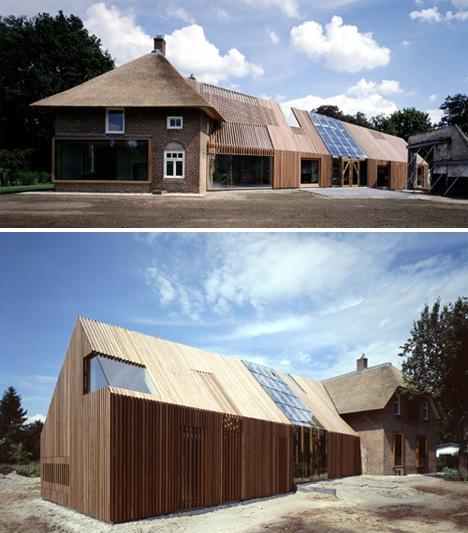
Barn to House adaptive reuse Designed by: Bjarne Mastenbroek (SeARCH)

Billboard to House adaptive reuse Designed by: Front Architects

Billboard to House adaptive reuse Designed by: Front Architects

Container to House adaptive reuse Designed by: Poteet Architects


Sources: